


Whoop Triggerz Plus
4.7385.00 Reviews
App Specs
- Version
- 2.1.46
- Updated On
- License
- Free
- Downloads
- 100,000+
- Developer
- The C-Dub Brand
- Categories
- Music & Audio
- Platform
- Android
Screenshots
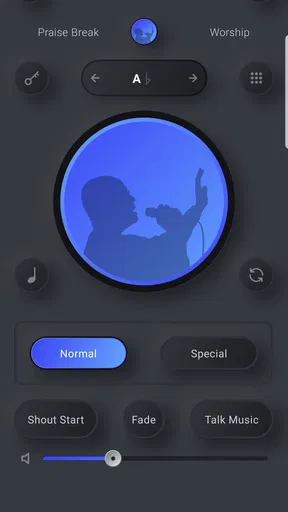
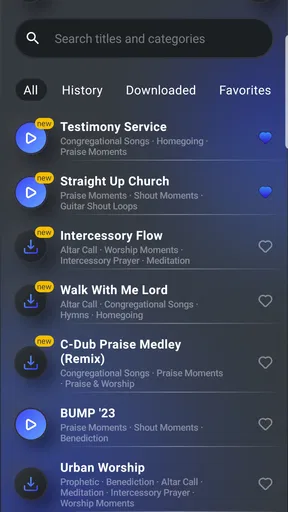
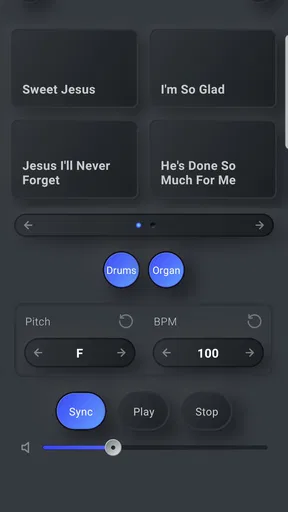
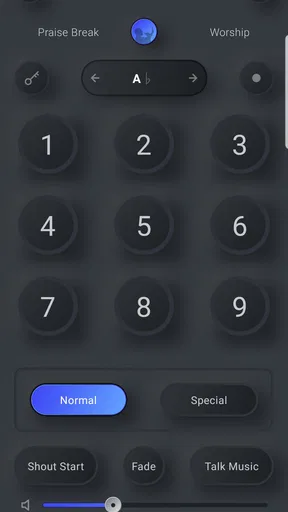
 Analysis by AppCompare
When I first heard about Whoop Triggerz Plus, I was a bit skeptical. I mean, an app that can enhance live music performances without needing a full band? Sounds like a dream, right? But being the curious tech enthusiast that I am, I had to give it a whirl. Spoiler: I was not disappointed!
Where a connection can shape the performance
For a musician, a phone is not just a place to browse sounds; it may be the tool sitting beside the mixer while a service or rehearsal is already underway. That makes connectivity part of the practical decision. I would prepare the sounds and performance setup before people arrive, rather than count on being able to browse, download, or troubleshoot in the middle of a song. A church basement with unreliable reception is a very different setting from a home rehearsal with a dependable network.
I also wouldn’t treat a network connection as a substitute for a sound check. Test the phone’s route into the sound system, set the intended levels, and try the transitions you plan to use. The app’s usefulness depends on the whole chain: the device, its audio output, the connection to the venue’s equipment, and the person triggering the sound. Sorting out those links in advance leaves fewer surprises when everyone is waiting for the next cue.
That preparation matters especially if you use the app to cover a brief gap rather than provide music continuously. A saved, rehearsed sequence can be easier to manage than trying to find a suitable sound while speaking or playing. I’d keep the plan simple: decide which moments need support, choose the material beforehand, and make sure you can reach the controls without hunting through menus.
A fit for rehearsals, services, and small setups
The strongest use case is a musician who already knows what a performance needs and wants a phone-based way to add support. A church musician working with a small team, a solo player filling out a transition, or a volunteer who needs a little more musical texture may find that approach practical. It is less compelling for someone who wants a complete recording studio or a general-purpose music player; the point here is to support live musical moments, not replace every tool a musician uses.
For example, picture a Sunday service where one player is covering several parts and needs a sound ready for a transition between songs. I’d set up and test that moment during rehearsal, then keep the phone positioned where the player can operate it without turning away from the group. The useful detail is not simply having extra sounds available: it is deciding in advance when they belong, so the trigger supports the music instead of distracting from it.
Compared with carrying a separate playback device or asking another person to manage cues, using a phone can reduce what needs to be brought and coordinated. A dedicated instrument or a full live band still offers more hands-on musical control, and a laptop-based setup may suit a performance that needs a broader production workflow. I’d choose this app when portability and quick access matter more than building a complex stage rig.
Worth Reading Before You Choose

Flipboard Shows What News Apps Must Do Beyond the Feed

Switching to Android Auto Means Rethinking Your Driving Routine

Google Calendar Makes a Crowded Week Easier to Manage

Ludo King Makes the Most of the Minutes Between Plans

Baby Panda World Brings Quick Play to Modern Phones, but Its Game Library Feels Busy

ESPN’s Live Game View Makes Following Close Games Easier
Planning for interruptions and recovery
Live use has a way of exposing small problems at the worst moment: a device notification, a cable that shifts, an accidental screen tap, or a sound that does not start when expected. I’d rehearse a fallback for each important cue, such as continuing without the added sound or having another musician cover the transition. That is not a criticism unique to this app; it is sensible practice whenever a phone becomes part of a performance.
Before a service or event, I’d also silence avoidable interruptions, keep the device within reach, and avoid making unfamiliar changes once the performance has begun. If a cue fails, pausing to navigate several screens can be more disruptive than carrying on with a simpler arrangement. A dependable setup is often the one with fewer moving parts, even if it uses only a small portion of the available options.
For recovery, I’d check the basics in order: confirm the phone is still connected to the sound system, verify the intended output and level, then try the cue again during a safe rehearsal moment. Rapidly changing several settings at once makes it harder to tell what fixed the issue. The practical lesson is to learn the route from the app to the venue’s speakers before relying on it in front of an audience.
Choosing a sensible data routine
Because this is a music app used in real settings, I would think about network access as part of preparation rather than assume it will be available everywhere. Set aside time before travel or rehearsal to handle any browsing or setup that requires connectivity, then avoid unnecessary last-minute changes. That approach is useful whether the venue has strong reception or not, and it keeps the performance plan from depending on an uncertain signal.
People also reasonably ask whether they need to spend money to get started. The app is free to install, while in-app purchases range from $24.99 to $239.99 per item. I’d look at the actual sound options and intended use before buying anything, and compare the purchase against how often I expect to use it. For an occasional volunteer role, starting cautiously makes more sense than paying for material that may never fit the group’s style.
Whoop Triggerz Plus is developed by The C-Dub Brand and is in the Music & Audio category. It has a 4.6 average from 942 ratings, with 50K+ installs, and its content rating is Everyone. The current version is 2.1.29, and it requires Android 8.0 or later. Those details make it easier to judge whether it suits your device and comfort level, but the real test is still whether the workflow fits your music and venue.
Who will appreciate it—and who may not
I’d recommend it most to musicians who have a clear, modest job for it: adding a prepared sound, supporting a transition, or making a small live setup feel more complete. It may also suit someone who wants to explore performance sounds without bringing another piece of equipment. The app is less likely to be the right answer for players who need extensive editing, elaborate multitrack production, or the tactile control of dedicated hardware.
It may also frustrate anyone who expects a phone to remove the need for rehearsal. Even a straightforward cue needs timing, appropriate volume, and coordination with the people on stage. If the sound clashes with the arrangement or arrives at the wrong moment, extra features will not rescue the performance. I’d begin with one or two carefully chosen uses and expand only after the group is comfortable with them.
One useful trade-off is that a compact phone setup is easy to carry but can be less forgiving to operate under pressure than a purpose-built control surface. Before relying on it, decide how you will hold or position the phone, what you need to see at a glance, and who is responsible for triggering each sound. That small division of responsibility can prevent the common problem of everyone assuming someone else is handling the cue.
The Magic of Live Music Enhancement
Let me set the scene. Imagine you're in a small church, and the band is running late. Panic? Not with Whoop Triggerz Plus in your pocket. This app is essentially a musician's Swiss Army knife, designed to fill in the gaps during live performances with ease. From background loops to dynamic sounds, it promises to elevate the musical experience.
Getting Started
Installation was a breeze. Available on both Android and iOS, downloading the app was as simple as a few taps. Once installed, I was greeted by a friendly interface. The layout is intuitive, which is crucial when you're in the middle of a live performance and need to make quick adjustments.
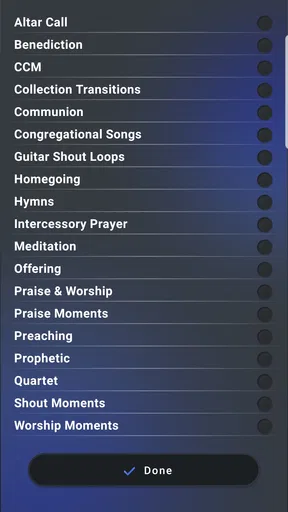
The app offers a variety of sound packs that cater to different musical styles. Whether you're into gospel, pop, or jazz, there's something for everyone. I was impressed by how easy it was to navigate through the options and find exactly what I needed.
Features That Stand Out
One of my favorite features is the "Auto Play" function. It allows you to set up a sequence of sounds to play automatically, which means you can focus more on your performance and less on managing the app. It's like having an invisible DJ on your team!
Another cool feature is the "Tap Tempo". This nifty tool lets you sync the tempo of the loops with the live performance, ensuring everything sounds cohesive. I found this especially helpful during fast-paced songs where timing is everything.
Performance and Usability
In terms of performance, Whoop Triggerz Plus is solid. I tested it on both a high-end and a mid-range device, and it ran smoothly on both. The sound quality is top-notch, which is crucial for any music-related app. There was no noticeable lag or delay, even when I was switching between different sound packs rapidly.
The app also supports MIDI controllers, which opens up a whole new world of possibilities for professional musicians. I tried connecting a MIDI keyboard, and the integration was seamless. It's these little details that make the app stand out from the crowd.
Community and Support
One thing I always look for in an app is the community behind it. Whoop Triggerz Plus doesn't disappoint in this area either. There's an active online community where users share tips, tricks, and even custom sound packs. It's a great resource for anyone looking to get the most out of the app.
If you ever run into issues, the support team is just an email away. I had a minor query about setting up the tap tempo, and the response was prompt and helpful. It's always nice to know that there's support available when you need it.
Final Thoughts
All in all, Whoop Triggerz Plus is a fantastic app for anyone involved in live music performances. Whether you're a solo artist, part of a band, or a church musician, it offers tools that can genuinely enhance your music. The combination of ease of use, robust features, and excellent support makes it a must-have in any musician's toolkit.
If you're still on the fence, I highly recommend giving it a try. You might just find it becomes an indispensable part of your musical journey. Happy performing!
Pros
- Intuitive interface for easy navigation.
- Extensive library of sound packs.
- Customizable triggers for personalization.
- Real-time playback without latency.
- Compatible with both Android and iOS.
Cons
- Limited free features without subscription.
- Occasional bugs during updates.
- Requires stable internet for optimal use.
- Some sound packs are premium only.
- Interface can be overwhelming for newbies.
FAQs for Whoop Triggerz Plus
What is Whoop Triggerz Plus and what does it do?
Whoop Triggerz Plus is a music app designed specifically for church musicians and worship leaders. It provides a library of loops, sounds, and triggers that can be used to enhance live worship sessions. With its intuitive interface, users can seamlessly integrate these elements into their performances, creating a more dynamic and engaging worship experience.
Is Whoop Triggerz Plus compatible with both Android and iOS devices?
Yes, Whoop Triggerz Plus is available for both Android and iOS platforms. It can be downloaded from the Google Play Store and Apple App Store. The app is optimized for use on both smartphones and tablets, ensuring a smooth and user-friendly experience across different devices.
Does Whoop Triggerz Plus require an internet connection to function?
While an internet connection is required to download the app and access updates, Whoop Triggerz Plus can be used offline once the desired loops and sounds are downloaded. This feature makes it convenient for users to perform without needing a constant internet connection, especially in areas with limited connectivity.
Are there any in-app purchases or subscription fees associated with Whoop Triggerz Plus?
Whoop Triggerz Plus offers both free and premium content. While the basic version of the app is free, additional loops and sounds may require in-app purchases. For full access to all features and content, users can opt for a subscription plan, which provides regular updates and exclusive materials.
How user-friendly is Whoop Triggerz Plus for beginners?
Whoop Triggerz Plus is designed with a user-friendly interface, making it accessible for both beginners and experienced users. The app includes tutorials and guides that help users get started quickly. Its intuitive design allows users to easily navigate through the app and customize their worship sessions efficiently.


